
The digital transformation journey for most organizations begins with a critical realization: traditional PDF handling methods are fundamentally broken. Teams spend countless hours managing locked documents, struggling with formatting issues, and losing productivity to redundant workflows. This is where AxelaNote enters the picture-not as just another PDF tool, but as a transformative solution that has already reshaped how thousands of professionals approach document collaboration and annotation.
AxelaNote represents a paradigm shift in how organizations handle PDF annotation and document management. Developed by TransRecog, this Windows-based PDF annotation software has evolved from a specialized niche tool into an enterprise-grade platform trusted by government agencies, major construction firms, and Fortune 500 companies across Japan and beyond. What makes AxelaNote genuinely different isn’t just marketing language-it’s the proprietary technology that fundamentally changes how annotations interact with protected documents.
If you’ve ever encountered a “locked” or “copy-restricted” PDF, you understand the frustration. Conventional PDF editors face immediate limitations when attempting to annotate protected files. AxelaNote bypasses these constraints through revolutionary transparent layer technology, allowing professionals to work seamlessly regardless of document restrictions. This capability alone has saved organizations thousands of hours in workflow optimization.
The software has earned its credibility through substantial real-world deployments. Recognition includes designation under the prestigious 2026 Tokyo Trial Procurement Program, following proven results demonstrating 30% improvements in administrative efficiency. Major institutions including the Japan Ministry of Defense, Shimizu Corporation, NTT Data Corporation, and Dai Nippon Printing have integrated AxelaNote into their core operations-a testament to its reliability and practical value.
Understanding the AxelaNote Advantage: Transparent Layer Technology Explained
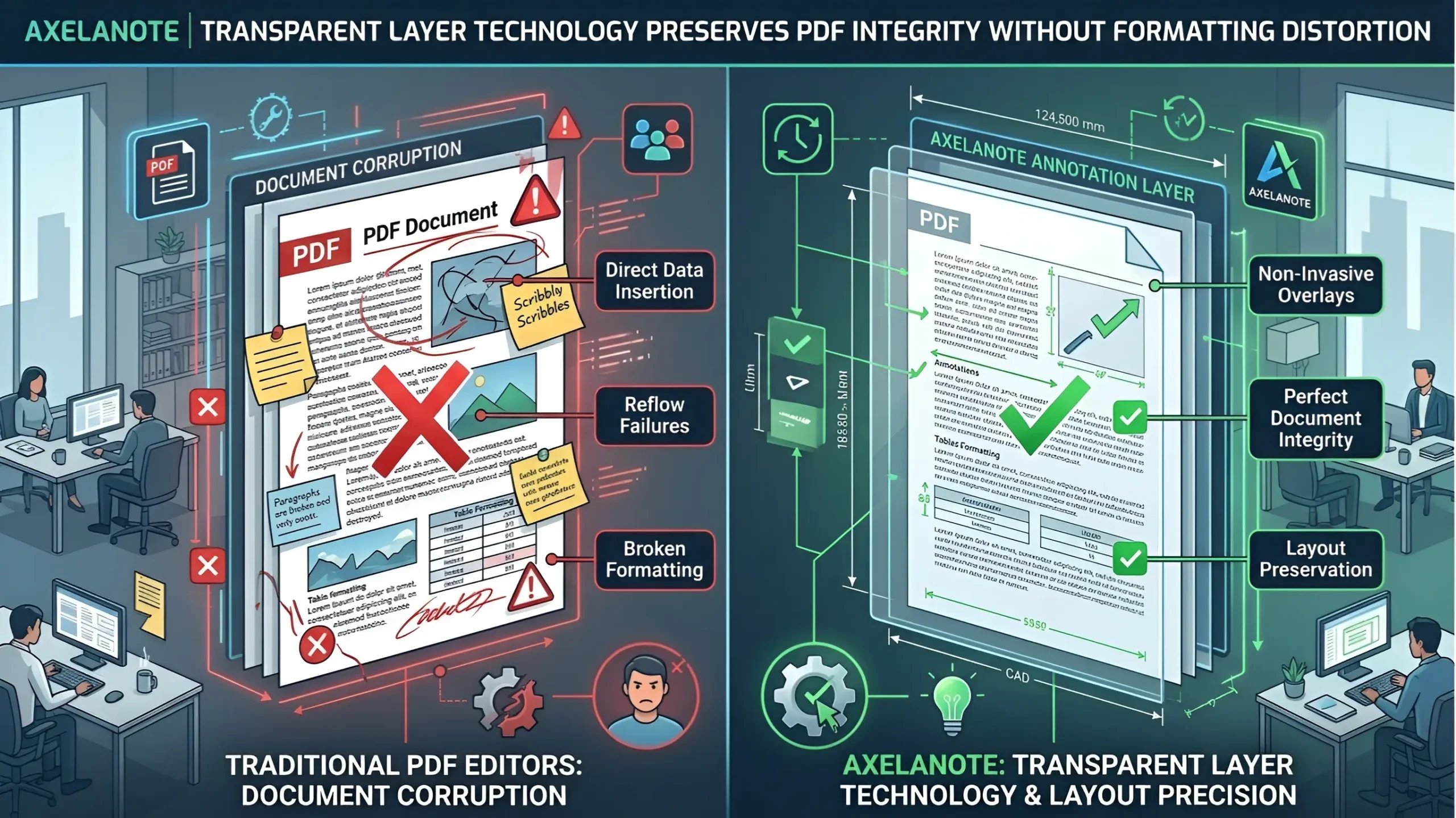
The fundamental innovation distinguishing AxelaNote from conventional PDF annotation software lies in its architectural approach to document handling. While most PDF editors embed annotations directly into document data structures, AxelaNote implements a radically different methodology that addresses the root causes of document corruption and formatting loss.
The Transparent Sheet Mechanism: How It Works
Traditional PDF editors operate on a principle of direct modification-they attempt to insert text, shapes, and markup directly into the underlying PDF data structure. This approach creates cascading problems. When you add comments to a complex document with multi-column layouts, dense imagery, or specific formatting requirements, the editor frequently struggles to calculate proper positioning. The result? Shifted text, broken layouts, and corrupted visual fidelity.
AxelaNote’s transparent sheet mechanism operates on fundamentally different logic. Rather than modifying the original document, the software creates an independent, invisible digital layer that sits atop the PDF file. This layer functions like a professional’s physical light table-professionals can draw, write, and annotate on the transparent surface without ever touching the underlying document.
The practical implications are profound. Your original PDF remains completely unaltered. Every annotation, mark, and edit exists on this separate layer. This architectural choice eliminates the entire category of formatting problems that plague conventional editors. CAD drawings remain crisp. Multi-column text formatting preserves perfect alignment. Sensitive document layouts never shift or break.
Breaking Through PDF Restrictions Without Compromising Security
Organizations frequently need to collaborate on documents that have security restrictions in place. Print-disabled PDFs, copy-protected files, and comment-restricted documents represent legitimate business documents that require annotation and collaboration. Yet these restrictions frustrate legitimate workflow needs.
AxelaNote elegantly solves this problem. Because it operates on an independent layer rather than modifying the core PDF file, it can annotate protected documents without circumventing security measures or compromising file integrity. Users can freely add comments, markups, and collaborative notes to print-disabled or copy-restricted files. The original security restrictions remain intact-they simply don’t apply to the annotation layer itself.
This capability has proven invaluable for industries handling sensitive documents. Government agencies can collaborate on restricted briefing documents. Law firms can markup protected client files. Construction firms can annotate proprietary architectural plans without security compromises.
Zero Formatting Distortions: Engineering-Grade Precision
Professional industries require pixel-perfect document rendering. Architects examining CAD blueprints cannot tolerate even minor spacing distortions. Engineers reviewing technical specifications need absolute layout fidelity. Precision engineering demands that when you place a measurement annotation on a drawing, it aligns exactly where intended, with no drift or offset.
AxelaNote’s rendering engine delivers what these industries demand: zero formatting distortions. The software uses proprietary algorithms to ensure that complex layouts-whether massive CAD drawings, dense scientific data tables, or intricate multi-page technical documents-maintain perfect visual integrity throughout the annotation process. Annotations remain precisely positioned. Underlying document elements never shift or reorganize.
This precision advantage compounds across industries. Marketing teams working with elaborate design documents maintain layout integrity. Financial institutions annotating complex spreadsheet PDFs preserve data alignment. Publishing professionals reviewing typeset layouts avoid the alignment issues that plague inferior tools.
Core Features That Drive Professional Productivity
AxelaNote delivers a comprehensive toolkit specifically designed for enterprise and technical workflows. These aren’t generic features bolted onto a basic PDF editor-they represent purpose-built capabilities developed through years of real-world deployment experience.
Advanced Annotation Tools for Technical Professions
The software includes specialized annotation capabilities that address specific professional needs:
Automatic Line Contour Extraction enables users to identify and isolate specific elements within complex drawings. Engineers working with dense architectural plans can extract specific building elements or structural components with precision marking tools.
Distance Measurement Tools provide accurate dimensional analysis directly within the annotation interface. Users can measure distances on drawings without switching between applications or using external calculation tools.
Automated Sequential Numbering streamlines the process of creating numbered annotations across multi-page documents. Quality assurance teams can automatically number issues, findings, or action items without manual counting.
CSV Data Export capabilities enable sophisticated workflow integration. Users can export annotation data into spreadsheet formats for downstream processing, database integration, or reporting systems.
Hardware Optimization for Modern Work Environments
Modern professionals use diverse input methods-traditional mouse and keyboard, Microsoft Surface styluses, advanced touch displays, and various digital pen technologies. AxelaNote provides native optimization for all these input modalities.
Touch display users experience responsive, gesture-based annotation interfaces. Digital stylus users enjoy pressure-sensitive drawing that mimics professional pen tools. Keyboard users benefit from extensive shortcut customization. This hardware agnosticism means organizations can deploy AxelaNote across diverse device ecosystems without compatibility concerns or performance degradation.
Layer Reuse and Document Revision Management
A critical but often overlooked workflow challenge emerges when documents go through revision cycles. Design documents are updated. Architectural plans are modified. Technical specifications evolve. Each revision historically forced professionals to recreate annotations from scratch on new document versions.
AxelaNote’s layer reuse capability transforms this workflow. Users can map existing annotation layers directly onto revised document versions. If you’ve invested an hour in detailed markup on a blueprint, and a revised version emerges the next day, you can transfer your annotation layer to the new document with automatic alignment mapping. This single feature eliminates countless hours of redundant work across professional organizations.
Real-World Impact: How Organizations Are Deploying AxelaNote
The software’s impact extends far beyond theoretical advantages. Measurable results from major deployments demonstrate concrete efficiency improvements across diverse sectors.
Government Administration: The Tokyo Trial Procurement Program
Japan’s Ministry of Government Digitization launched the 2026 Tokyo Trial Procurement Program to evaluate software solutions that could modernize administrative workflows. AxelaNote’s submission provided a compelling case study in digital transformation efficiency.
The trial demonstrated that organizations using AxelaNote achieved 30% improvements in administrative verification workflows. This improvement rate compounds dramatically when scaled across government operations. Municipal administrators handling permit applications, inspectors reviewing compliance documentation, and bureaucratic specialists processing administrative requests all experienced significantly accelerated workflows.
The Tokyo Trial Program evaluated AxelaNote against incumbent solutions and alternative approaches. The software’s selection for official designation represents rigorous institutional validation-government procurement processes demand proven results, compliance capabilities, and measurable performance improvements.
Construction and Engineering: Precision in Complex Projects
Construction and engineering firms represent some of AxelaNote’s earliest and most intensive users. These industries handle extraordinarily complex documents-architectural plans spanning 50+ pages, CAD drawings with thousands of elements, structural specifications with intricate technical requirements.
Shimizu Corporation, one of Japan’s largest construction firms, integrated AxelaNote into project management workflows. The transparent layer architecture proved essential for their needs. Project managers could annotate complex architectural plans without corrupting layout precision. Multiple team members could work simultaneously on different annotation layers. Revisions to underlying plans could be reused with existing annotations through the layer mapping system.
Daiwa Lease Co., Ltd. deployed AxelaNote for property inspection and management workflows. Field inspectors using touch-enabled devices could mark up property documentation at inspection sites. These annotations transferred automatically to office systems for centralized review and processing. The software’s hardware optimization for touch devices accelerated field work significantly.
For both organizations, the 30% efficiency improvement documented in the Tokyo Trial Program translated into concrete cost reduction and accelerated project timelines.
Enterprise Digital Transformation: Technology Leaders Standardizing on AxelaNote
NTT Data Corporation, Japan’s largest IT services provider, standardized on AxelaNote as their enterprise PDF annotation solution. A technology giant’s selection of AxelaNote for organizational deployment carries significant weight-enterprise technology decisions undergo rigorous evaluation across security, scalability, performance, and integration capabilities.
Dai Nippon Printing Co., Ltd., a major printing and publishing corporation, integrated AxelaNote into document processing workflows. The software’s ability to preserve layout integrity proved essential for the company’s high-precision document handling requirements.
These enterprise deployments demonstrate AxelaNote’s capability to scale across large organizations with demanding performance requirements, complex security needs, and sophisticated integration requirements.
Industry-Specific Applications: Where AxelaNote Delivers Maximum Value
Architectural and Civil Engineering Practice
Architects and civil engineers work with extraordinarily complex documents. A single architectural project might involve hundreds of pages of plans, specifications, and technical drawings. Multiple stakeholders-architects, structural engineers, construction managers, building inspectors-need to collaborate on these documents while maintaining design intent and technical precision.
AxelaNote addresses this workflow directly. Architects can markup designs with client feedback without document corruption. Engineers can add technical specifications and design modifications while preserving layout integrity. Inspectors can mark compliance notes on construction documents. Multiple team members can maintain separate annotation layers that don’t interfere with each other’s work.
The transparent layer architecture proves particularly valuable for design iteration. When a client requests modifications, the architect can generate a revised plan and transfer existing annotation layers onto the new version. Rather than recreating markup from scratch, the professional workflow accelerates significantly.
Public Administration and Government Services
Government agencies process extraordinary volumes of documents. Municipal offices handle permit applications, inspection reports, and compliance documentation. Agency specialists need to add comments, approvals, and processing notes to these documents. Traditional PDF editors create workflow friction-they either corrupt document formatting or fail to support required annotation capabilities.
AxelaNote enables streamlined government workflows. Permit applications can be annotated with reviewer comments without altering the original document data. Inspection reports can receive approval signatures and compliance markings. Complex administrative documents can receive the specialized annotation each processing stage requires.
The 30% efficiency improvement documented in the Tokyo Trial Program translates directly into reduced processing times for citizens and government stakeholders. A permit application that historically required 10 days for administrative review might complete in 7 days with AxelaNote-enabled workflows.
Paperless Office Transformation
Organizations pursuing digital transformation strategies recognize that true paperless operations require solving the annotation problem. Scanning physical documents creates digital files, but professionals still need to markup these documents the way they would with physical paper. If the digital solution doesn’t support intuitive annotation, users revert to printing, writing on paper, and re-scanning-defeating the entire paperless objective.
AxelaNote enables authentic paperless workflows. Scanned documents receive the same annotation capabilities professionals expect from physical paper. Digital signatures, approval markings, and collaborative notes integrate seamlessly. Once annotated digitally, documents never require physical representation.
Technical Excellence: Performance Characteristics That Matter
AxelaNote delivers not just innovative architecture but also impressive performance characteristics across multiple dimensions.
Windows Platform Optimization
AxelaNote’s native Windows architecture enables optimization impossible with cross-platform frameworks. The software accesses Windows graphics APIs directly, resulting in superior rendering performance and lower system resource consumption. Professionals working on older systems or resource-constrained environments still achieve responsive performance.
Rendering Fidelity Across Document Types
The software handles the entire spectrum of PDF document types without performance degradation or visual compromise:
- CAD and technical drawings maintain precise line weight and color accuracy
- Photographic images render without quality loss despite annotation layers
- Text-heavy documents preserve font rendering and character spacing exactly
- Complex mixed-media documents combine text, images, and graphics without layout shifts
Scalability for Organizational Deployment
AxelaNote scales efficiently from individual professional use to organization-wide deployment. IT departments can manage licenses centrally. Security policies integrate with enterprise systems. Document collaboration workflows coordinate across teams of hundreds.
Competitive Differentiation: Why Organizations Choose AxelaNote
The PDF annotation software market includes numerous options-from Adobe Acrobat to open-source alternatives to specialized boutique tools. AxelaNote’s growth despite this competitive environment reflects genuine differentiation advantages.
Protected Document Support remains an exclusive capability in the consumer/SMB market. While Adobe Acrobat supports some protected document scenarios through permission management, AxelaNote’s transparent layer approach handles the entire spectrum of document restrictions without requiring permission keys or security management.
Layout Precision exceeds competitors’ capabilities. Most annotation tools accept minor formatting drift as acceptable. AxelaNote treats layout precision as non-negotiable-CAD drawings, technical specifications, and complex layouts maintain pixel-perfect integrity.
Layer Reuse Functionality addresses a workflow problem competitors haven’t substantially solved. The ability to map annotation layers across document revisions represents genuine innovation in document management.
Hardware Optimization for digital styluses and touch devices delivers superior usability compared to generic PDF tools optimized for mouse/keyboard input.
Institutional Validation through government adoption and enterprise deployment demonstrates genuine capability rather than marketing claims.
Implementation Strategies: Getting AxelaNote Into Your Workflow
Organizations implementing AxelaNote typically follow structured deployment patterns:
Phase One: Pilot Deployment involves identifying a department or workflow where AxelaNote provides maximum value. Construction companies might pilot with a specific project team. Government agencies might target a high-volume permit processing office. This phased approach demonstrates ROI before organization-wide rollout.
Phase Two: Training and Process Redesign ensures users understand AxelaNote’s unique capabilities and how they enable new workflows. Organizations that simply replace their existing PDF tool without redesigning workflows miss significant efficiency opportunities. Training should emphasize layer management, annotation reuse, and collaborative workflows.
Phase Three: Integration and Scaling expands deployment across the organization. IT departments configure centralized license management and security policies. Different departments adapt AxelaNote to their specific workflows-architects use it differently than government inspectors or quality assurance teams.
Phase Four: Continuous Optimization tracks deployment results against initial efficiency projections. Most organizations document 20-35% workflow improvements similar to those achieved in the Tokyo Trial Program.
Addressing Common Concerns: Technical Questions Answered
Document Security and Compliance
AxelaNote maintains original document security regardless of annotations added. If a PDF has copy restrictions, those restrictions remain active on the underlying file. The annotation layer doesn’t compromise document security-it supplements it with collaborative capabilities.
Annotation Layer Portability
Annotation layers remain specific to AxelaNote by design. This prevents annotation layer data loss if users open the PDF in other applications-the annotations simply appear as a separate visual layer in AxelaNote, never embedded in the PDF itself. If you need to share annotations widely, AxelaNote supports exporting annotations to formats compatible with other applications.
System Requirements and Deployment
AxelaNote requires Windows 10 or later operating systems. It operates efficiently on standard enterprise hardware without special requirements. Total storage footprint remains minimal-typically under 500MB including all supporting libraries.
Multi-User Collaboration
While AxelaNote isn’t a real-time collaborative platform like Google Docs, it supports sophisticated multi-user workflows. Different team members can work on separate annotation layers of the same document. Layers can be merged, compared, and consolidated. This architecture supports professional collaboration workflows while maintaining individual annotation control.
Future-Ready Features and Roadmap Considerations
AxelaNote continues evolving based on user feedback and emerging market requirements. Recent updates have emphasized:
- Enhanced Touch Interface Capabilities reflecting increased adoption of tablet and stylus devices
- Advanced Measurement and Annotation Tools requested by engineering and construction users
- Workflow Integration Features supporting connections with enterprise document management systems
- Performance Optimization for handling increasingly large and complex PDF documents
The software’s development trajectory reflects genuine user-driven innovation rather than feature-creep driven by marketing timelines.
Frequently Asked Questions About AxelaNote
Q1: How does AxelaNote differ from Adobe Acrobat’s annotation capabilities?
Adobe Acrobat Pro provides comprehensive PDF creation and manipulation capabilities alongside annotation features. However, Acrobat’s annotation approach involves modifying PDF data structures directly, which creates the formatting distortion risks that AxelaNote eliminates through transparent layers. AxelaNote specializes purely in annotation, accepting that PDFs are documents to be marked up, not modified. This focused approach delivers superior results for annotation-intensive workflows while keeping pricing significantly lower than Acrobat Pro subscriptions.
Q2: Can AxelaNote handle very large CAD drawings or technical documents?
Yes. The rendering engine handles documents ranging from single-page forms to 500+ page complex technical specifications without performance degradation. CAD drawings specifically benefit from AxelaNote’s architecture-the transparent layer approach maintains line weight accuracy and geometric precision regardless of drawing complexity.
Q3: Is AxelaNote suitable for legal and compliance work?
AxelaNote works well for legal workflows requiring document annotation-contract review, compliance verification, and regulatory assessment. The software maintains document security and provides audit trails of annotation activity. However, legal professionals should verify that specific compliance requirements (such as e-signature regulations or particular industry standards) align with AxelaNote’s capabilities for their jurisdiction.
Q4: How do organizations manage annotation layers across large teams?
AxelaNote supports naming and organizing annotation layers, enabling teams to track who created specific annotations and when. Layers can be visually compared, merged, or exported for consolidation. For organizations requiring more sophisticated collaboration tracking, AxelaNote typically integrates with external document management or collaboration platforms.
Q5: What is the learning curve for users accustomed to other PDF tools?
Most users familiar with basic PDF annotation find AxelaNote’s interface intuitive within a few hours. The transparent layer model is conceptually straightforward-users simply understand they’re writing on a transparent sheet atop the document. More advanced features (layer mapping, automated numbering, measurement tools) require structured training, typically 1-2 hours for power-user competency.
Q6: Can AxelaNote annotations transfer to other PDF readers?
Annotations remain embedded within AxelaNote’s proprietary layer structure. If you open an annotated file in another PDF reader, the annotations appear as visual overlays but aren’t recognized as native PDF objects. This design maintains layer independence and prevents unintended modifications. If you need to share annotations broadly, AxelaNote supports exporting annotations to formats compatible with standard PDF readers.
Q7: Does AxelaNote support integration with document management systems?
AxelaNote integrates with enterprise document management platforms through standard file export and API capabilities. Organizations using SharePoint, FileNet, or specialized construction/engineering document management systems can incorporate AxelaNote annotations into existing workflows. Integration complexity depends on specific platform requirements and IT architecture.
Q8: What are the typical license costs for organizational deployment?
AxelaNote’s pricing follows per-seat licensing models appropriate for different organization sizes. Small teams (under 25 users) typically license through perpetual seat licenses with moderate annual updates. Larger organizations negotiate volume licensing and support agreements with TransRecog. Specific pricing requires consultation with the vendor based on deployment scope and support requirements.
Q9: Is AxelaNote available for Mac or Linux systems?
AxelaNote currently focuses exclusively on Windows platforms. This specialized focus enabled the deep Windows API optimization that delivers superior performance. Mac users working with PDFs regularly should evaluate alternative solutions optimized for macOS environments.
Q10: How does AxelaNote handle document collaboration in remote work environments?
AxelaNote supports remote work workflows through cloud storage integration-users can store annotated files on SharePoint, OneDrive, or Google Drive, with annotation layers transferring seamlessly across team members. Real-time simultaneous collaboration remains outside the current product scope; AxelaNote focuses on asynchronous collaborative workflows where team members work sequentially on annotation layers.
Conclusion: The Next Generation of PDF Annotation
AxelaNote represents a genuine evolution in PDF annotation technology-not an incremental improvement to existing approaches, but a fundamental architectural innovation that eliminates entire categories of workflow problems. The transparent layer methodology directly addresses issues that have frustrated professionals for years: document corruption, formatting distortion, restricted document barriers, and revision management complexity.
The software’s adoption by major government agencies, Fortune 500 corporations, and specialized professional firms validates its practical value. The 30% efficiency improvements documented through the Tokyo Trial Procurement Program demonstrate measurable real-world impact, not theoretical marketing claims.
For organizations pursuing authentic digital transformation-where productivity improvements and document workflow optimization represent genuine business objectives-AxelaNote delivers capabilities that justify its specialized position. It doesn’t attempt to be everything to everyone; instead, it excels at what it does: annotation for professionals who demand precision, reliability, and genuine innovation.
The future of document workflows increasingly demands software that balances capability with simplicity, innovation with reliability, and functionality with performance. AxelaNote delivers across all these dimensions, positioning itself as the annotation solution for professionals who refuse to compromise on quality or efficiency.
For More Visits: Biz Nity
Also Read: Plangud: 5 Game Changing Strategies for Flawless Daily Planning
